Guide4 min read
What happens to your numbers when you add more water
Adding bacteriostatic water lowers concentration, so the same milligram amount lands on a different syringe line. Here is the math and the check.
Written by
ChatPEP Team- Published
- Published
- Updated
- Updated
Adding more bacteriostatic water (the sterile, bacteria-inhibiting water used to dissolve a vial) lowers the concentration of a solution, which is how much compound sits in each unit of liquid. The same milligram amount then measures out in more syringe units. Checking the concentration before the volume is the quick way to catch a mismatch.
What concentration means here
Concentration is how much compound sits in each unit of liquid. On a 100-unit insulin syringe, 100 units equal 1 ml. When a vial labeled 10 mg is dissolved into a liquid, the total amount does not change, but the number of units it is spread across does. More water makes more units, so each unit holds less of the compound.
Because calculator results often show micrograms, convert the vial amount first. One milligram equals 1,000 micrograms. A 10 mg vial holds 10,000 mcg whether you add 2 ml or 3 ml of water. The only difference is how many units those micrograms are divided into. That one conversion keeps the rest of the arithmetic simple.
What adding water changes
Adding water changes concentration and the syringe line for a given amount. It does not change the total amount in the vial or the total amount you are trying to measure. A 10 mg vial holds 10,000 mcg. With 2 ml of water, those 10,000 mcg sit in 200 units. With 3 ml, they sit in 300 units. The same target amount therefore requires more units as water increases.
This matters because people sometimes check the syringe line before the concentration. If the water amount is wrong, the line will be wrong even when the target amount is right. Checking concentration first is the faster way to spot the mismatch. The water volume is the variable that moves every number downstream, so it is worth checking twice.
Two volumes worked side by side
A 10 mg vial holds 10,000 mcg. The table uses a target amount of 1,000 mcg, which is just a number that shows where the syringe line lands.
| Water added | Total liquid | Concentration | Units for 1,000 mcg |
|---|---|---|---|
| 2 ml | 200 units | 50 mcg per unit | 20 units |
| 3 ml | 300 units | 33.33 mcg per unit | 30 units |
This information is for research only. Not intended for human use.
At 2 ml, each unit holds 50 mcg. At 3 ml, each unit holds about 33.33 mcg. To reach the same 1,000 mcg, the first case uses 20 units and the second uses 30 units. The amount did not change; the concentration did. A calculator may round the decimals, but the relationship stays the same.
Where a calculator helps
A useful reconstitution tool (a tool for mixing the dried powder into a measured liquid) should make concentration its own line and show how the unit total was reached. ChatPEP's reconstitution calculator works the arithmetic on the numbers you enter 1. You type the vial amount, the water amount, and the target amount. It returns the concentration, the syringe units, and the same volume in milliliters 1.
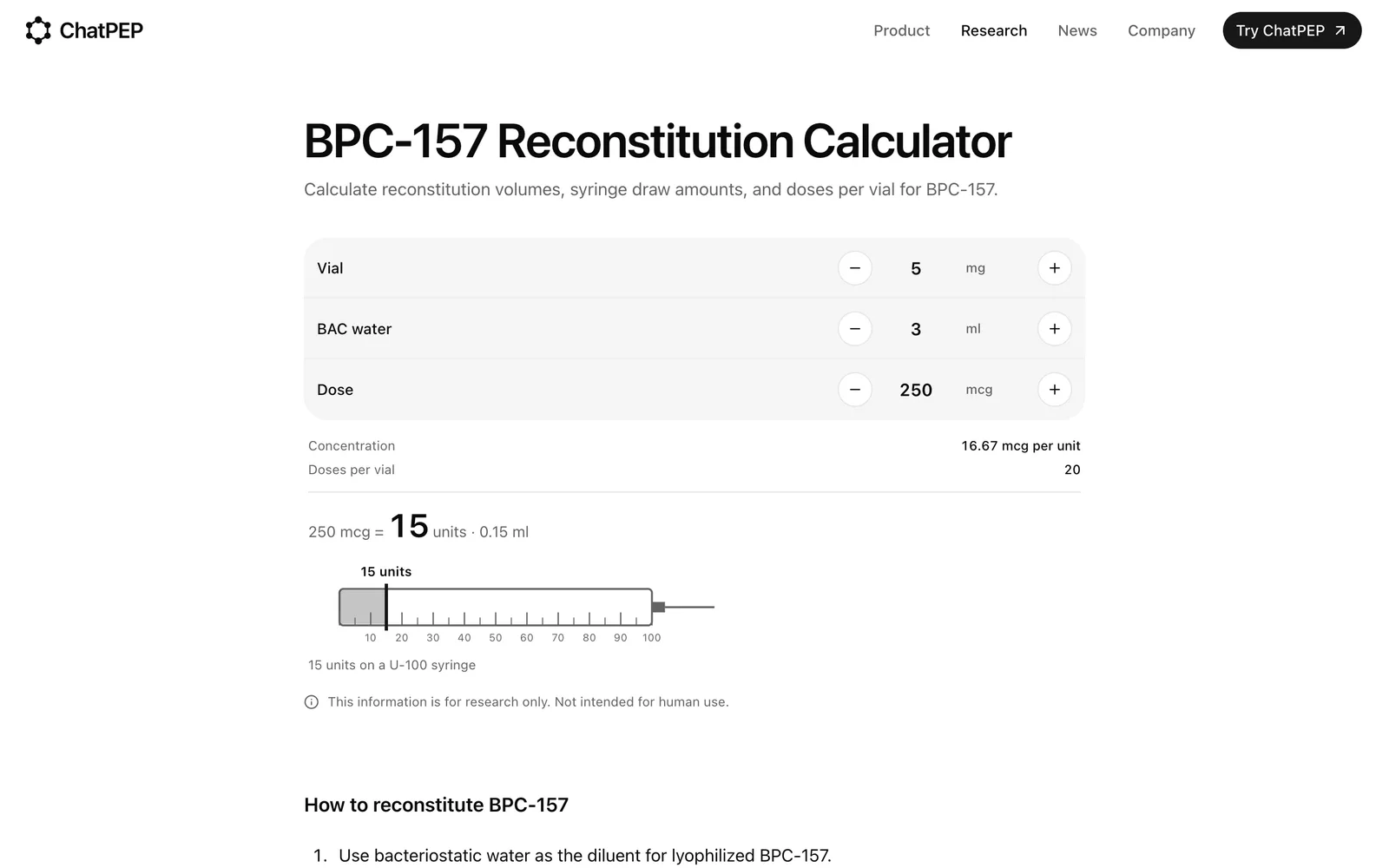
The calculator counts on a 100-unit syringe scale, where 100 units equal 1 ml 1. It also tells how many times that target amount fits in the vial, rounded down to a whole number 1. It does the arithmetic and does not suggest an amount 1. Keeping concentration visible is what makes the water change easy to see.
Check the numbers you entered
The result is only as accurate as the numbers you enter, so check them against the vial label 1. A stale water amount can carry over because the web calculator opens with the last numbers set in that browser 1. Switching units can also reset fields, so check all three after a unit change 1.
When the water volume is off by a milliliter, the concentration moves in step. Checking the vial amount, the water amount, and the target amount in that order catches most arithmetic mistakes before they reach a syringe line. The calculator can only do the math on what it receives.
What the calculator will not tell you
The calculator does not know what is actually in the vial, and it does not check whether an amount makes sense 1. It works only with the numbers you enter 1. If you ask ChatPEP to recommend an amount, it will describe the amounts studies used instead and will not turn them into instructions for you 2. That separation is the point of a research tool. The calculation chip carries only numbers, not a compound name, so the calculator does not know which compound the numbers belong to 3. It does not flag an amount that seems out of range, because it does not check whether an amount makes sense 1. ChatPEP answers add that context by describing what was studied, in whom, and how strong the evidence is 2.
Who this is not for
- If you want a tool to recommend an amount, this guide and the calculator do not do that. ChatPEP describes studied protocol amounts but does not turn them into instructions 2.
- If you want a calculation that checks what is in the vial without you reading the label, the calculator cannot do that 1.
- If you want a walkthrough of self-injection or human use, ChatPEP points to a qualified medical professional and stays on the research question 2.
References
Get a reconstitution number right
ChatPEP answers from the studies, with every source cited, and never tells you what to take.
Keep reading
Guide3 min read
How to check the math when two vials share a syringe
Two compounds in one syringe means two concentrations to track. This checklist shows which number stays fixed, which changes, and how a blend calculator keeps each share separate.
Guide3 min read
How to work out mcg per unit on an insulin syringe
A plain walkthrough that starts with the vial label and water volume, builds a microgram-per-unit table, and shows the same arithmetic in a reconstitution calculator.
Guide4 min read
What a reconstitution result shows, and what it leaves out
A reconstitution calculator converts vial size, water, and an entered amount into concentration, units, and doses per vial. This guide explains what each result line means and what the math leaves out.