Guide3 min read
How to work out mcg per unit on an insulin syringe
A plain walkthrough that starts with the vial label and water volume, builds a microgram-per-unit table, and shows the same arithmetic in a reconstitution calculator.
Written by
ChatPEP Team- Published
- Published
- Updated
- Updated
To convert micrograms to units on an insulin syringe, start with concentration, how many micrograms sit in each unit. Divide the amount you want by that concentration. This guide carries one worked example from the vial label to the syringe line, with every step shown.
Start with the label and the water
Concentration is the missing number in any microgram-to-unit conversion. The calculator uses a U-100 insulin syringe scale, where 100 units equal 1 ml; U-40 and U-50 syringes count units differently and are not offered by the calculator. The vial label tells you how much compound is in the vial, usually in milligrams, and the amount of water used for reconstitution (dissolving the vial powder to make a liquid) sets the total liquid volume. Those two facts together make the concentration.
One mg equals 1,000 mcg. If a vial holds 10 mg, that is 10,000 mcg. If 2 ml of water is added, that makes 200 units of liquid, because 2 ml times 100 units per ml is 200 units. The concentration is 10,000 mcg divided by 200 units, or 50 mcg per unit.
Make your own units table
With the concentration in hand, the conversion is division. Here is the worked example as a step list:
- Convert the vial amount to micrograms: 10 mg x 1,000 = 10,000 mcg.
- Convert the water to units: 2 ml x 100 = 200 units.
- Divide to find concentration: 10,000 mcg / 200 units = 50 mcg per unit.
- Divide the desired amount by 50 to get units.
- Divide units by 100 to get milliliters.
| Desired amount (mcg) | Units | Volume (ml) |
|---|---|---|
| 100 | 2 | 0.02 |
| 250 | 5 | 0.05 |
| 500 | 10 | 0.10 |
| 1,000 | 20 | 0.20 |
This information is for research only. Not intended for human use.
The table is computed, not estimated. For 250 mcg, 250 divided by 50 is 5 units, and 5 units divided by 100 is 0.05 ml. The same division works for any number you enter, as long as the vial and water stay the same.
What the calculator does
A reconstitution calculator does this exact arithmetic and can attach the numbers to a message so you do not have to carry the division by hand. ChatPEP has a reconstitution calculator that takes three numbers: vial amount, BAC water (the water used to dissolve the vial powder), and desired amount 1. On the web, the calculator screen shows the vial, water, and desired amount fields, and it shows the calculated units and volume in text.
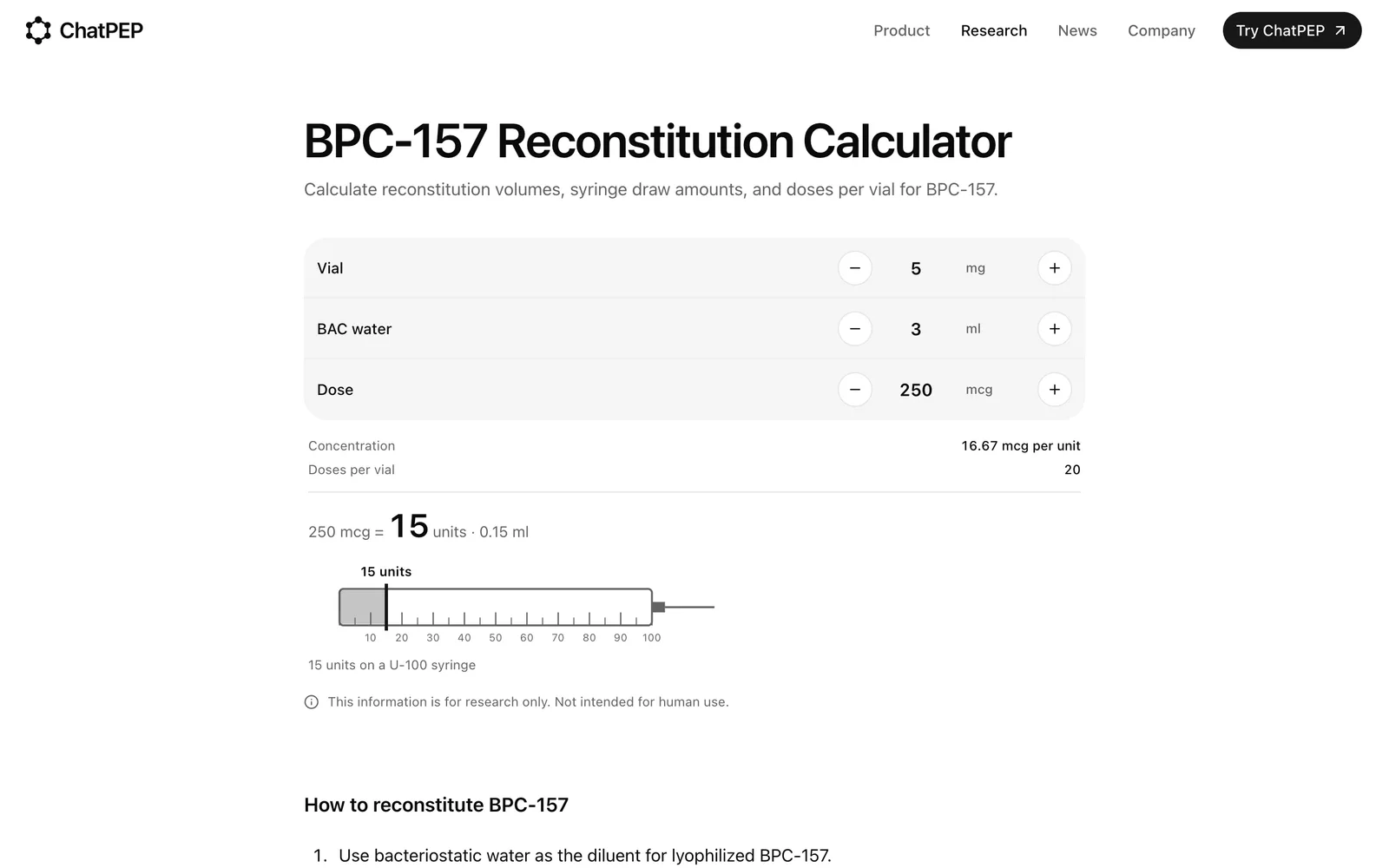
The calculator counts on a 100-unit syringe scale, where 100 units equal 1 ml 1. With the example numbers, it returns a concentration of 50 mcg per unit, 20 units for 1,000 mcg, 0.2 ml, and 10 doses per vial 1. When you attach a calculation to a message, ChatPEP reads the vial amount, the water, the concentration, and the units exactly as the calculator worked them out 2. The calculator never suggests an amount 1.
Where the calculator stops being useful
The arithmetic is only as good as the numbers you enter. The calculator does not know what is in the vial, it does not check whether an amount makes sense, and it never tells anyone what to take 1. If the label is wrong or the water volume is off, every result downstream is off. That is true for hand math and for any tool. For blends, the single-compound calculator cannot show how much of each component is in a draw. ChatPEP's blend calculator separates the components, but you still need to match every amount to the label 3. ChatPEP is a research tool. It reports studied protocols but does not turn them into instructions for you 4.
Who this is not for
- Not for anyone who wants a calculator to recommend an amount. ChatPEP never tells anyone what to take, how much, or when 4.
- Not for anyone who wants the tool to confirm that an amount is safe. The calculator only does arithmetic on what you enter and does not check whether an amount makes sense 1.
- Not for anyone who needs injection instructions or medical advice. ChatPEP does not walk anyone through injecting or self-administering 4.
- Not for someone working with a blend on iPhone who needs the full per-component breakdown. That breakdown is available on the web calculator 3.
Compound pages
References
Get a reconstitution number right
ChatPEP answers from the studies, with every source cited, and never tells you what to take.
Keep reading
Guide3 min read
How to check the math when two vials share a syringe
Two compounds in one syringe means two concentrations to track. This checklist shows which number stays fixed, which changes, and how a blend calculator keeps each share separate.
Guide4 min read
What happens to your numbers when you add more water
Adding bacteriostatic water lowers concentration, so the same milligram amount lands on a different syringe line. Here is the math and the check.
Guide4 min read
What a reconstitution result shows, and what it leaves out
A reconstitution calculator converts vial size, water, and an entered amount into concentration, units, and doses per vial. This guide explains what each result line means and what the math leaves out.